發表文章

目前顯示的是有「VB6」標籤的文章

[VB6]Mid函數start起始值

圖片
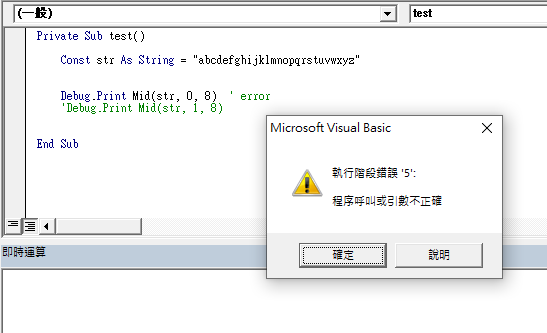
 Mid為擷取指定位置&長度的部分字串, 其起始位置start param.起始值為1, 非0開始 start param.=0, failure “Run-Time Error '5': Invalid Procedure Call or Argument” start param.=1, successful ref

[VBA]Format函數無法正確補零

圖片
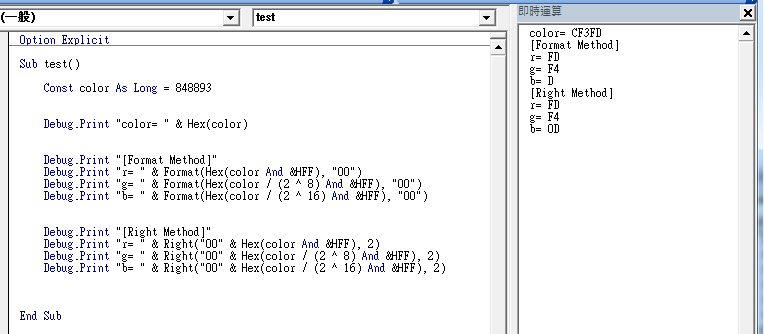
 近期使用Format函數補齊Hex的位數, 在0xA-0xF區間遇到無法補0的問題 改用Right函數即可 Ref: Format function (Visual Basic for Applications) | Microsoft Docs Right function (Visual Basic for Applications) | Microsoft Docs

[VB6]Optional parameters for function declares

Private Sub SomeSub(Optional SomeParam As Integer = 0) ' user code End Sub Ref https://docs.microsoft.com/zh-tw/dotnet/visual-basic/programming-guide/language-features/procedures/optional-parameters https://stackoverflow.com/questions/4071820/default-value-for-function-parameters-in-vb6

[VB6]Random Seed

圖片
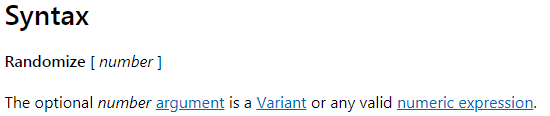
初始化亂數產生器 只呼叫Randomize()後面不加參數, 以系統時間做為亂數種子 如果沒呼叫Randomize(), 則每次產生的亂數都一樣 Ref https://docs.microsoft.com/zh-tw/office/vba/language/reference/user-interface-help/randomize-statement

[VB6]Select Case - multiple expressions or ranges in each Case

圖片
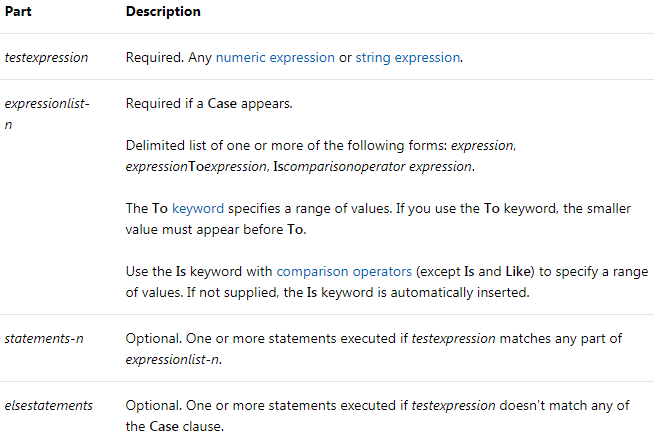
Dim Number Number = 8 ' Initialize variable. Select Case Number ' Evaluate Number. Case 1 To 5 ' Number between 1 and 5, inclusive. Debug.Print "Between 1 and 5" ' The following is the only Case clause that evaluates to True. Case 6, 7, 8 ' Number between 6 and 8. Debug.Print "Between 6 and 8" Case 9 To 10 ' Number is 9 or 10. Debug.Print "Greater than 8" Case Else ' Other values. Debug.Print "Not between 1 and 10" End Select Ref https://docs.microsoft.com/zh-tw/office/vba/language/reference/user-interface-help/select-case-statement

[VB6]Invalid procedure call or argument (Error 5)

圖片
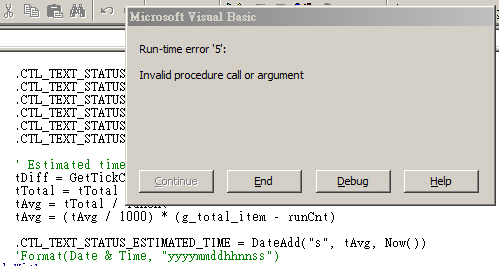
在win7 on VM的環境上執行VB6 Enterprise 呼叫DataAdd func會產生Error 5 原以為是參數填錯, 再三確認後, 並在Excel VBA執行無誤 最後在stackOverflow看到是VB6設定相容性的問題 將相容模式取消即可 錯誤訊息 取消相容模式 原先的相容模式 Ref https://stackoverflow.com/questions/30043195/error-calling-dateadd-function

[VB6]使用Load / Unload呼叫Form

在一般情況下使用 Show Method 呼叫表單只有在第一次呼叫時會產生 Form_Load 事件 , 爾後使用 Show Method 呼叫不會產生 Form_Load 事件 , 因 Form 已被載入至 Memory 中 . 當如果有情況是需要每次執行 Form 都 Initialization, 則使用 Show Method 就不適合 . 解決辦法 使用 Load 則每次呼叫會發出 Form_Load 事件 , 執行 Form_Load 裡面的 Code. 使用 Load 將 Form 載入記憶體後 , 並不會顯示Form , 再呼叫一次 Show 即可顯示 Form. 離開 Form 使用 Unload 將 Form 從 Memory 卸載 , 常用的 Hide Method 僅隱藏表單 , 相關資料還是在 Memory 中 Load Statement https://docs.microsoft.com/en-us/previous-versions/visualstudio/visual-basic-6/aa445825(v%3dvs.60) Unload Statement https://docs.microsoft.com/en-us/previous-versions/visualstudio/visual-basic-6/aa445829(v%3dvs.60)
[VB6]使用File Dialog選擇檔案

圖片
加入 Common Dialog 的控件 , 成功加入後出現紅框的 Icon 表示成功 Microsoft Common Dialog Control 6.0 Control Object of Form 先在 Form 上建立 CommonDialog 的控件 , 如未建立使用控件會跳出 Variable not defined. Button 呼叫 CommonDialog, 顯示 FileDialog Private Sub CTL_BTN_SEL_FILE_Click() With CommonDialog1 .DialogTitle = "Select the Report File" .Filter = "Custom Format (*.xls)|*.xls" .Flags = .Flags + cdlOFNHideReadOnly .InitDir = specialPath("Desktop") .ShowOpen CTL_BTN_SEL_FILE.Caption = .fileName End With End Sub Property DialogTitle As String 設定 Dialog 的 Title Property Filter As String 設定檔案類型 https://docs.microsoft.com/en-us/previous-versions/visualstudio/visual-basic-6/aa238813(v=vs.60) Property Flags As Long 設定屬性 https://docs.microsoft.com/en-us/previous-versions/visualstudio/visual-basic-6/aa238842(v=vs.60) Property InitDir As String 設定初始位置 Sub ShowOpen () 顯示 File Dia...

[VB6]MSFlexGrid使用記錄

圖片
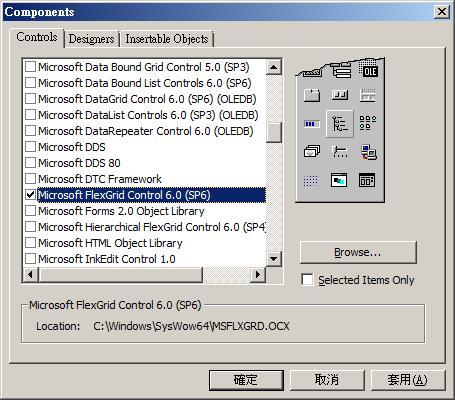
- 設定 於 Components 加入 MSFlexGrid Microsoft FlexGrid Control 6.0 (SP6) C:\Windows\SysWow64\MSFLXGRD.OCX 加入後即在 Component Panel 上出現 MSFlexGrid 的控件 ( 紅框處 ) 在 Form 上建立 MSFlexGrid 控件 ,  對控件按右鍵可設置其 Property Common Property Style Property   Font Property   Color Property   Picture Property 在 Code 中設置 Property 較有彈性 , 故於選單中的屬性怒不設定 - 記錄 ' configuration property of MSFLESGRID1 With MSFlexGrid1 .AllowBigSelection = False .ColAlignment(-1) = flexAlignCenterCenter .FixedCols = 0 .FixedRows = 1 .HighLight = flexHighlightNever .ScrollBars = flexScrollBarVertical .ScrollTrack = True End With Property AllowBigSelection As Boolean 在 Row / Column 點選 Header 時 , 全選該 Rows 或 Columns Property ColAlignment (index As Long) As Integer 指定 Columns 的文字對齊 , -1 表設置全部 Columns Property FixedCols As Long Property FixedRows As Long 指定 Header 的數量 Property HighLight As HighLightSettin...

[VB6]bit-shift operation

圖片
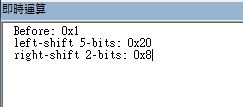
VB6/VBA不支援 "<<" & ">>"的位元操作 (C/C++/C#) a = b << n ;b左移n bits a = b >> n ;b右移n bits (VB/VBA) a = b * (2 ^ n) '左移, 乘以2的n次方 a = b / (2^ n) '右移, 除以2的n次方 Demo code Option Explicit Sub bit_shift() Dim reg As Byte reg = &H1 ' 1 Debug.Print "Before: 0x" & Hex(reg) ' 2 reg = reg * (2 ^ 5) Debug.Print "left-shift 5-bits: 0x" & Hex(reg) ' 3 reg = reg / (2 ^ 2) Debug.Print "right-shift 2-bits: 0x" & Hex(reg) End Sub Result

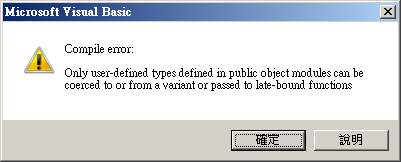
[VB6]only user-defined types defined in public object modules can be coerced to or from a variant or passed to late-bound functions

圖片
自定義Type類型於module中, 無法傳入function/sub函數 因user-define type無法與variant相容 下面為error code Line 19, UC51 宣告為 DRIVER_INFO , 傳入 IsEmptyArray()的source為Variant-type 兩種type無法強制轉換 只能將 IsEmptyArray() 的 source 宣告為 REGISTER-type 但導致 IsEmptyArray() 只能接受 REGISTER-type , 無法接受其他data type Option Explicit Private Type REGISTER name As String addr As Byte bank As Integer End Type Type DRIVER_INFO strID As String reg() As REGISTER End Type Sub main() Dim UC51 As DRIVER_INFO Dim tmpBuf() As String Debug.Print IsEmptyArray(tmpBuf) Debug.Print IsEmptyArray(UC51.reg) ' error here End Sub Function IsEmptyArray(source As Variant) As Boolean On Error GoTo ERROR_HANDLER If UBound(source) >= 0 Then Exit Function End If ERROR_HANDLER: IsEmptyArray = True End Function

[VB6]強制轉換變數類型 Type conversion functions

圖片
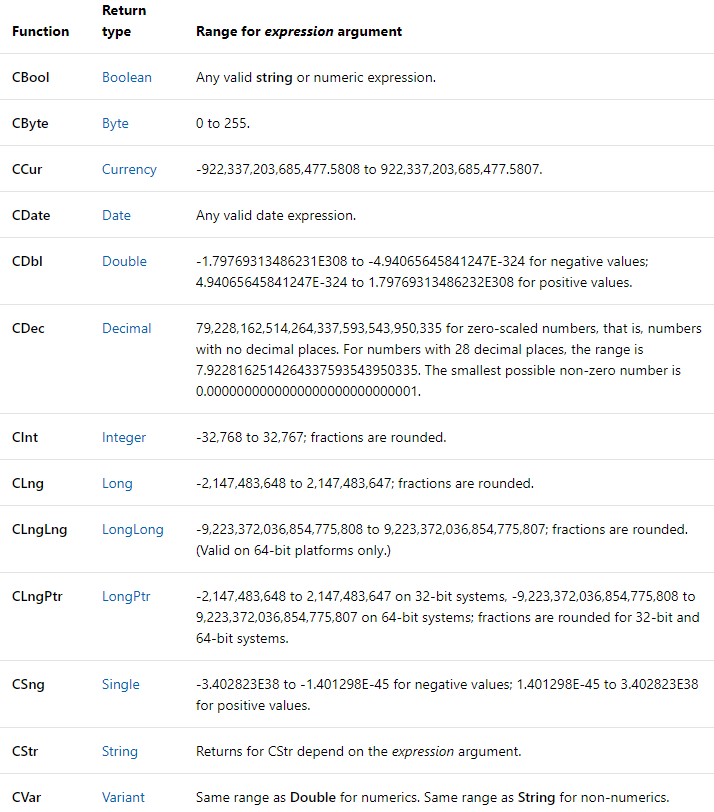
Syntax CBool( expression ) CByte( expression ) CCur( expression ) CDate( expression ) CDbl( expression ) CDec( expression ) CInt( expression ) CLng( expression ) CLngLng( expression )  (Valid on 64-bit platforms only.) CLngPtr( expression ) CSng( expression ) CStr( expression ) CVar( expression ) Resource https://docs.microsoft.com/zh-tw/office/vba/language/concepts/getting-started/type-conversion-functions

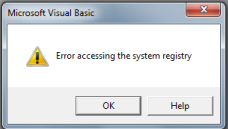
[VB6]Error accessing the system registry (Win7SP1)

圖片
於Windows 7 Sp1 x64安裝完VB6, 執行時出現Error accessing system registry的錯誤訊息 - Solution 以 相容模式 & 系統管理員身分執行 VB6.EXE 即可